I’ve been a volunteer with my local chapter of the Mississippi State Alumni Association for quite a while. A recurring chore is having people sign in at events. The two most popular methods of having people sign in seem to be caveman-style (pen and paper) or QR codes linked to a form. I’ve done both, but will admit I’m partial to caveman. I recently saw someone at another chapter presenting some coasters he had printed with QR codes on them. This lit a dim bulb for me—someone was willing to pay money to make this easier, and we don’t have a universally adopted solution.
Tchecke Is Born
About the name
It’s pronounced CHECK-ee. I was thinking it might be cool to have little tchotckes (e.g., a small bulldog) with an embedded NFC tag allowing you to tap to sign in. You’d be recognized after your first tap, so subsequent sign-ins become almost frictionless. Anyway tchotchke morphed into tchecke, and amazingly the domain was available.
Value prop
Tchecke allows individual chapters/groups/whatever to sign up and operate independently. Chapter admins could easily export CSVs, etc to send upstream. It’s also flexible in that parent organizations could later assume an enterprise role (e.g., adopt existing children, create new children) giving them access to child entity data (e.g., API, Zapier).
Easy Check-In options
NFC
I’ve never written to an NFC tag before so here was my excuse. I ordered some stickers from Amazon, installed NFC21 Tools on my iPhone and made my first disappointing discovery—they’re not lying, the range for these things is pretty limited. In my really scientific testing with my new stickers and an iPhone 13 Pro it looked like I need to be inside about 2.5cm to read the tag.
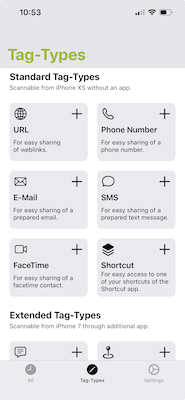
Regarding NFC21 Tools, it was the first—and so far only—app I’ve tested to read and write data so I have no opinion on the best tool out there. This app did what I wanted so it’s currently my favorite.
Some NFC21 Tools’ basic options for your tag
The stickers are roughly the size of a quarter.
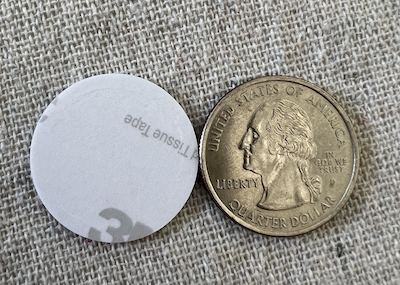
I guess tcheckes won’t have embedded NFC tags, nbd having them surface mounted is still an option.
QR
I have a number of small ideas around QR generation. One I toyed with is having some paper craft options for 3D shapes (e.g., cube, pyramid).
The dream
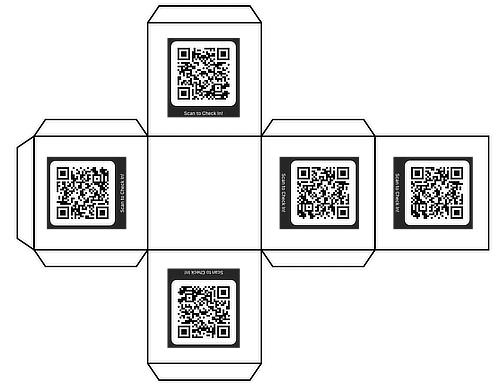
The reality
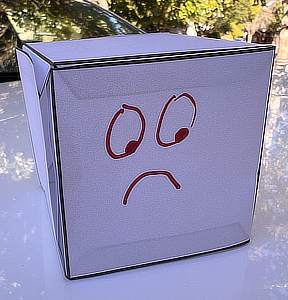
I still like the idea of this, but in practice I’m not sure users would be pleased with the results after their crooked cuts and folds. It’s on the maybe list now along with the ability to overlay the QR with an arbitrary image.
Host mode
Chapter admins also have a host mode UI where they can manually add a new attendee, search through previous attendees, or flash the event’s QR code to get someone checked in.
Switching Gears
The stack
Next.js
React
Supabase
Database notes
I’m using Supabase CLI for local dev on this project. Supabase provides a way to manage schema changes
https://supabase.com/docs/guides/local-development/declarative-database-schemas
but to keep things interesting/complicated I’m using Prisma migrations.
Claude Code usage evolving
My priorities in attempting to keep this loosely looking like a reliable dev process
DB schema’s source of truth is a YAML file
Minimize tech debt, let’s start with clean Typescript, etc.
Structured directory of markdown files documenting architecture, features, etc.
I have a project-specific CLAUDE.md file that lays out my rules, document structure, etc. Some excerpts below
## Tech Stack

- **Framework:** Next.js 16 (App Router with Turbopack)
- **UI:** React 19.2.0, Tailwind CSS 4, TypeScript 5
- **Database:** PostgreSQL via Supabase (Cloud for production, CLI for local dev)
- **ORM:** Prisma for type-safe database access and migrations
- **Build:** Turbopack for fast development and production builds
- **Styling:** Tailwind with PostCSS 4, custom CSS variables for theming
- **Observability:** OpenTelemetry for distributed tracing and monitoring

**Local Development Setup:** See [`architecture/setup/SUPABASE_LOCAL_DEV.md`](./architecture/setup/SUPABASE_LOCAL_DEV.md) for complete setup instructions.

**Quick Start:** See [`architecture/setup/QUICKSTART_LOCAL.md`](./architecture/setup/QUICKSTART_LOCAL.md) for a rapid onboarding guide.

**Database Setup:** See [`architecture/setup/PRISMA_SETUP.md`](./architecture/setup/PRISMA_SETUP.md) for complete setup instructions.

**Testing Guide:** See [`architecture/testing/README.md`](./architecture/testing/README.md) for comprehensive testing documentation.

## Project Structure

```
src/
  app/                    # Next.js App Router pages and API routes
    api/auth/             # Authentication endpoints (magic links)
    auth/                 # Auth UI pages (login, verify, error)
    layout.tsx            # Root layout with font configuration
    page.tsx              # Home page
    globals.css           # Global styles and Tailwind directives
prisma/
  schema.prisma           # Generated from architecture/core/SCHEMA.yml
  migrations/             # Database migration history
  seed.ts                 # Production database seeding script
  seed.dev.ts             # Development seed with rich test data
  seed.test.ts            # Test seed with minimal predictable data
  seed-helpers.ts         # Shared factory functions for seeding
architecture/             # Technical documentation and architecture decisions
  core/                   # Core architecture documentation
    BACKGROUND.md         # Product vision, entities, and adoption strategy
    TECHNICAL_CONSIDERATIONS.md  # Technical architecture principles
    SCHEMA.yml            # Canonical DB schema (source of truth)
  features/               # Feature-specific documentation
    HOST_MODE.md          # Host mode for chapter admins
    PROFILE_COMPLETION_FLOW.md  # User profile completion
```

## Architecture Documentation

The `architecture/` directory is the **canonical location for all technical documentation**, organized into four main categories:

### Directory Structure

- **`core/`** - Core architecture and product vision

  - `BACKGROUND.md` - Product vision, entities, and adoption strategy
  - `TECHNICAL_CONSIDERATIONS.md` - Technical architecture principles
  - `SCHEMA.yml` - Canonical database schema (single source of truth)


### Documentation Conventions

**When creating new documentation:**

- **Core architecture changes** → `architecture/core/`
- **New features** → `architecture/features/FEATURE_NAME.md`
- **Setup/integration guides** → `architecture/setup/FEATURE_SETUP.md`
- **Testing guides** → `architecture/testing/`

**Naming convention:** Use UPPERCASE for all architecture docs (e.g., `ROLE_MAPPING_ARCHITECTURE.md`, `PRISMA_SETUP.md`)

## Database Operations & Schema Guidelines

### Source of Truth

- **Canonical schema:** `architecture/core/SCHEMA.yml`
- **Always** consult this YAML file before creating tables, columns, or relationships.
- **Never** invent schema elements in Prisma or code.

### Prisma Integration

- Generate `prisma/schema.prisma` from YAML using the Node script.
- Use the Prisma client for all queries and mutations.
- Optional JSON fields (metadata, locations, badges) are supported via `Json` columns.

## Code Quality Standards

### TypeScript Configuration

- **Path alias:** `@/*` maps to `./src/*`
- **Target:** ES2017
- **Strict mode:** Enabled
- All TypeScript files use the Next.js plugin for type checking

### Linting Requirements

**IMPORTANT:** All code changes must pass linting before being committed.

```bash
npm run lint
```

**Requirements:**

- Lint must run with **zero errors** and **zero warnings**
- Fix all ESLint issues before committing code
- Common fixes:
  - Escape apostrophes in JSX: `We're` → `We're`
  - Remove unused variables and imports
  - Follow React/Next.js best practices

### Testing Requirements

**IMPORTANT:** All code changes must pass unit tests before being committed.

```bash
npm test
```

**Requirements:**

- All tests must pass with **zero failures**
- New features should include corresponding unit tests
- Bug fixes should include regression tests
- Test files should be co-located with source files using `.test.ts` or `.test.tsx` extension

**Testing Framework:**

- **Vitest** for unit and integration tests
- **React Testing Library** for component testing
- **happy-dom** for DOM simulation
I hope by having the schema defined in a file Claude can easily consult it instead of dreaming up needless or non-existent columns, etc. Try to force it to write better code by making lint and test pass. I’ve still seen some build failures, but it feels like it’s helping some.